PDF to Excel: why tables break and how to fix them
By the LambiPdf team · Updated 3 November 2026 · 8 min read
Getting a table out of a PDF and into a spreadsheet should be simple. Often it isn’t: columns merge, rows split in half and numbers arrive as text you can’t sum. The reason is that many PDFs don’t retain the spreadsheet structure you need. This guide explains what is really in the file, which tables convert cleanly and how to fix the ones that don’t.
Why a PDF table is different from spreadsheet cells
A spreadsheet knows that a value lives in row 4, column C. Many PDFs mainly record that the characters “1,250.00” are drawn at a certain position on the page, in a certain font. The lines that look like a grid are separate drawing instructions, if they exist at all. Some tagged PDFs also describe table structure. LambiPdf’s extraction uses text positions and alignment to infer rows and columns; it does not recreate the source workbook or its formulas.
Regular layouts are easier to infer, but still need checking. When it isn’t, the converter has to guess, and guesses are where tables break.
Tables that convert well
- Generated by software, such as invoices, bank statements and reports exported from an accounting system.
- Consistent columns, with every row following the same left-to-right order.
- One value per cell, rather than paragraphs wrapping inside cells.
- Clear gaps between columns, or ruled lines.
Common problems and how to fix them
Two columns merged into one
This happens when columns are very close together or a long value runs into its neighbor. In LambiPdf’s PDF to Excel converter you can split a column in the preview before you download. If the problem only affects one part of the page, select just the table area so headings and notes around it don’t confuse the column detection.
One row split across two lines
A description that wraps onto a second line can look like a new row with empty cells. Merge the rows in the preview, or fix them in the spreadsheet afterwards by joining the text into the row above.
Headers repeated on every page
Multi-page statements usually repeat the column titles at the top of each page. LambiPdf can join tables with compatible layouts across pages and drop repeated header rows, which gives you one continuous sheet instead of several stacked ones.
Numbers that won’t add up
If Excel left-aligns your figures and SUM returns zero, they arrived as text. LambiPdf can write recognised numbers and dates as typed Excel values when the selected column types and regional settings fit the data. Check the exported types before relying on totals and sorting. Watch for regional formats: “1.250,00” and “1,250.00” are the same value written in different conventions.
Leading zeros disappear
Account numbers, ZIP codes and product codes such as “00721” must stay text, or Excel strips the zeros. LambiPdf keeps identifiers with leading zeros as text. If you are pasting a CSV into Excel yourself, import it with the Data → From Text/CSV option and set those columns to Text.
Scanned tables
A scanned statement is an image, so there are no characters to position. LambiPdf reads such pages with on-device OCR as part of the conversion; you don’t need to run a separate OCR step. OCR adds its own risk of misread digits, so check totals against the original. For the cleanest scans, see our guide to OCR on scanned PDFs.
Excel or CSV?
Choose Excel (.xlsx) when you want to work in a spreadsheet straight away: number formats, dates and text columns are preserved. Choose CSV when the data goes into another system, such as accounting software, a database or a script. CSV is plain text with no formatting, which is exactly what import tools want. The PDF to CSV converter uses the same table detection.
A final check before you rely on it
Treat a converted table like data typed in by a careful colleague: something that needs comparison with its source. Compare the row count with the original, recompute one or two totals, and spot-check dates and long identifiers. The financial documents people convert are often private, which is why LambiPdf does all of this in your browser without uploading the PDF.
Try it: reconcile a three-row supply order
Download the fictional supply-order PDF. It contains one table with four columns, three item rows, a heading and a footer. All details are fictional. The surrounding text makes it useful for practising table-area selection.
- Open PDF to Excel and add the sample. Set the conversion Pages range to 1. The original-page viewer is only for comparison; it does not by itself restrict which pages are converted.
- Select the table area around its column headings and three rows, then choose Extract selected area. For this sample use Left 5%, Top 14%, Width 90%, Height 17% in the area fields. Exclude the document title and footer. Check that Item, Quantity, Unit price and Line total are separate columns.
- Keep the header row and review values and column types. Convert prepares the current table corrections; Preview lets you inspect the prepared result; Save opens its download review. Recheck the downloaded workbook, especially after Undo or any column changes.
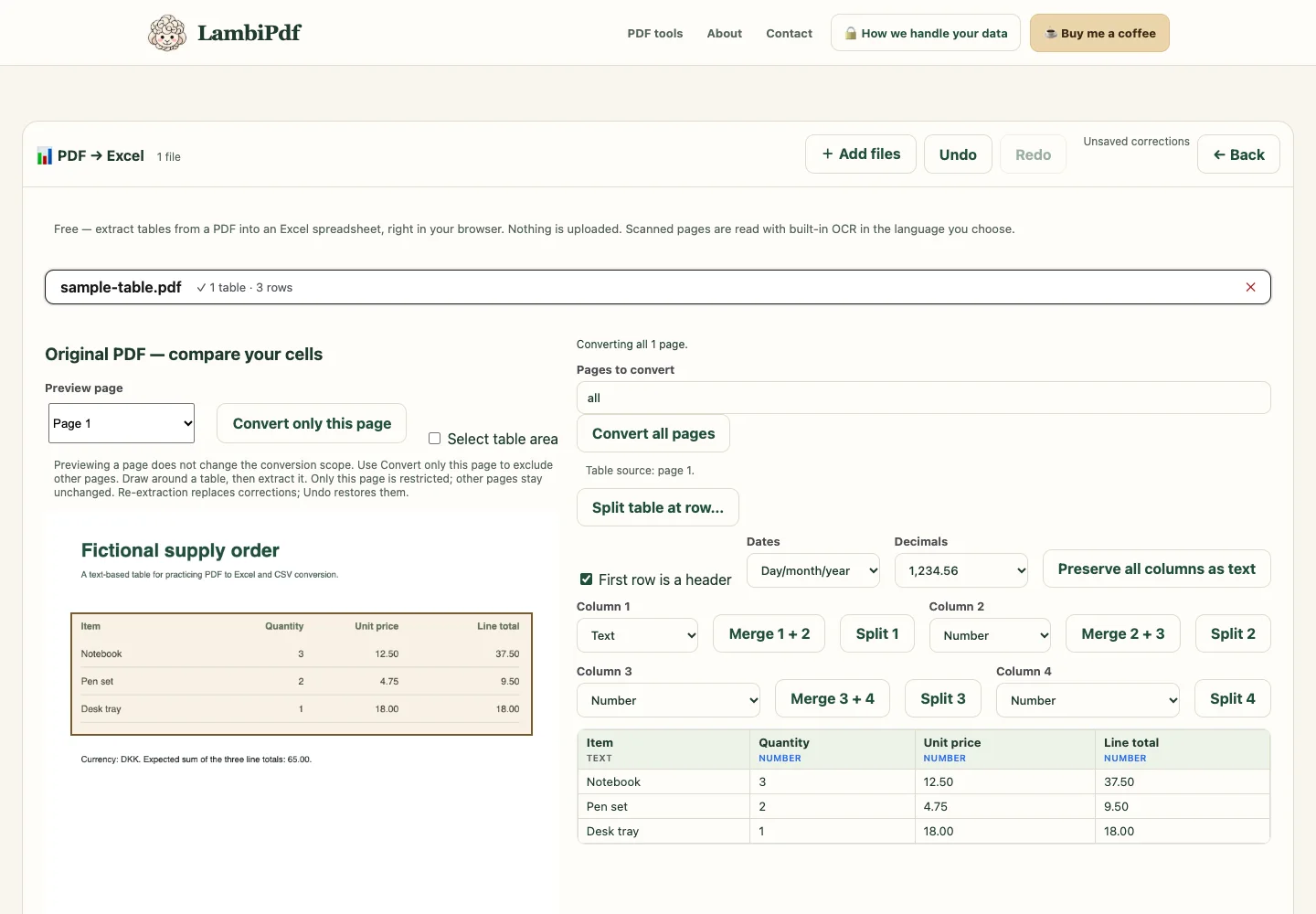
| Item | Quantity | Unit price | Line total |
|---|---|---|---|
| Notebook | 3 | 12.50 | 37.50 |
| Pen set | 2 | 4.75 | 9.50 |
| Desk tray | 1 | 18.00 | 18.00 |
Check the export, not just the detected table
The three line totals add up to 65.00 DKK. Compare your export with the workbook generated by LambiPdf, or the CSV generated from the same table. The browser check unzips the workbook, verifies the item values and checks numeric cells for 37.5 and 9.5. A missing display zero does not change the amount: 37.5 equals 37.50.
Limits: this text-based table is not a guarantee for bank statements, merged cells or scanned tables. The example does not test every spreadsheet application's rendering. PDF extraction does not recover the original spreadsheet formulas; recompute totals in your spreadsheet. CSV contains text records, not Excel formatting or column types, so inspect your import settings.
Questions people ask
Why does my PDF table come out in one column?
The converter could not see clear gaps between columns, often because the columns are very close or the text runs together. Select just the table area and split the column in the preview before downloading.
Can I convert a scanned bank statement to Excel?
Yes. Pages with no text are read with on-device OCR during the conversion. Check numbers against the original, because OCR can misread digits.
Should I choose Excel or CSV?
Choose Excel to work with the data yourself, with numbers and dates already formatted. Choose CSV to import the data into another program.
Sources and further reading
These references explain the underlying concepts. They are not endorsements of LambiPdf.